

A quick guide to the tuner settings for a motorised dish setup without USALS.
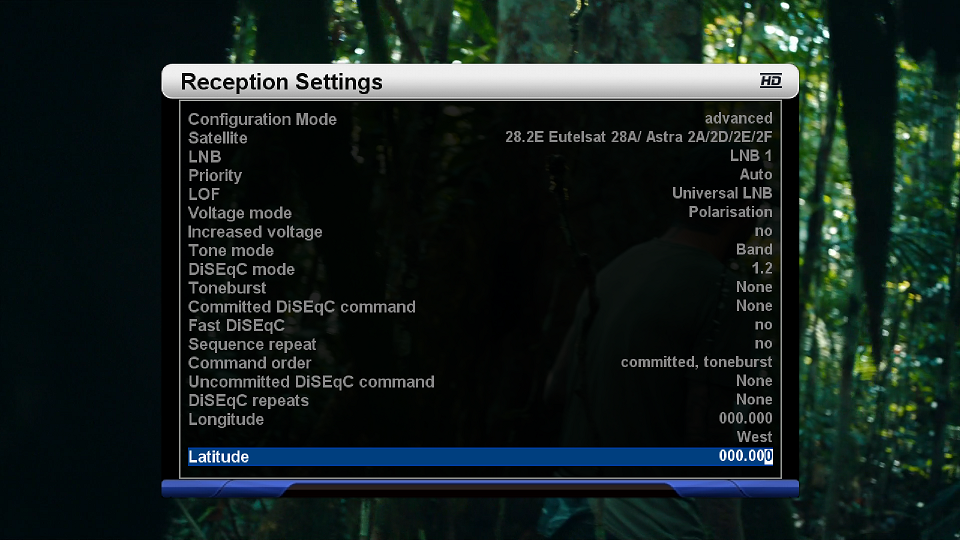
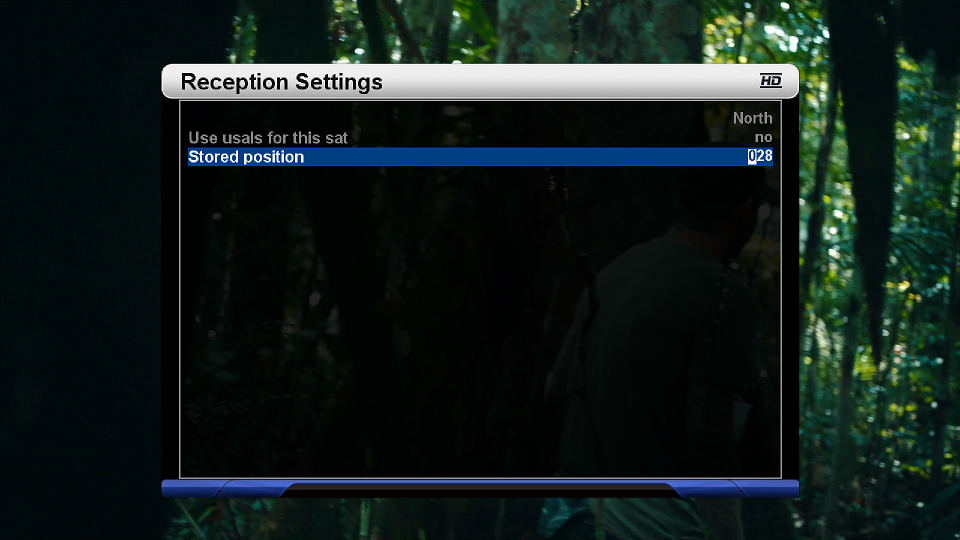
Tuner A is connected to the motorised dish and uses the Advanced setting. The first screenshot shows page 1 of the settings; the second shows page 2, where you enter your longitude and latitude for your location (you can get these from Dishpointer or Google Maps).
USALS is set to No. With USALS off, you store a position number for each satellite you want, and the dish motor moves to it — an up-to-date motor channel list is advised. In this example I'm using 28°E: in screenshot 2, USALS is "No", which gives the option to store a position number — I've used 028 for 28°E.
Mapping the dish and storing positions
To map your dish motor and set the stored positions, go to Service Searching → Positioner setup. There you can move the dish to whichever satellite you want and save that position — move to 28°E and save it as 028. Do this for every satellite you want to store, saving each with a different number (e.g. 16°E as 016, 13°E as 013).


Replies 2
mckee25
Discussion of article Tuner configuration setup for a Motorised dish using stored positions:
sebus
Why would this be any better than using Simple/Positioner setup?